

Salesforce, Salesforce Tips and Tricks
Cybersecurity Awareness Month 2026: A Checklist for IT Directors Evaluating Their MSP
October 06, 2026
Read Now.svg)

May 26, 2026
.svg)
.svg)



There's a moment every growing company hits with Salesforce. The platform is humming along, your teams are logging activity, pipelines are moving, and reports are running. Then, slowly, things start to feel off. A simple workflow takes three objects to complete. Your admin needs a flowchart just to explain how a record gets created. New hires take weeks to understand what fields matter. Sound familiar?
Growth is good. But if your Salesforce org's data model hasn't kept pace with your business, you're not just dealing with inconvenience — you're sitting on a ticking clock of technical debt, bloated customizations, and architectural decisions that made sense three years ago but are quietly strangling your team's productivity today.
Over the course of this series, we've talked about the importance of ongoing support, having a clear strategy, and building a structured delivery model. But all of that only works if the foundation underneath it — your data model — is sound. This is the conversation most organizations wait too long to have.
“Your business has grown. Your data model hasn't grown with it.”
Technical debt in Salesforce rarely announces itself. It doesn't crash your system or throw error messages on day one. Instead, it compounds quietly, one rushed customization at a time, one "we'll clean this up later" field at a time, one workaround built on top of another workaround. In Salesforce, technical debt typically looks like this:
Orphaned Fields and Objects: Fields created for a campaign that ended in 2021. Custom objects that were replaced by a new process but never removed. These artifacts clutter your page layouts, confuse your users, and inflate your data storage.
Formula and Validation Logic Sprawl: When business rules live in fifteen different validation rules, six flows, two process builders, and a trigger, no single person truly understands the full logic chain. Any change becomes a risk.
Relationship Complexity That Defies Logic: Lookup relationships stacked on top of master-detail relationships, junction objects that were never quite right, and cross-object formulas that reference four levels deep — these are signs that the data model was patched rather than planned.
Reporting Gaps: If your sales team can't get a clean answer to "how many deals closed last quarter by product line" without exporting to Excel and massaging the data, your data model is failing the business.
The danger of technical debt isn't just inefficiency. It's that each layer of debt makes the next change more expensive and riskier. You end up in a place where no one wants to touch anything because no one fully understands what will break.
Salesforce is extraordinarily flexible. That flexibility is one of its greatest strengths, but also one of its greatest risks.
Early in an org's lifecycle, that flexibility feels like freedom. Need a new field? Add it. Need a custom object to track something unique to your business? Build it. Need a flow that sends an email, updates three records, and creates a task based on seventeen conditions? Sure, why not?
But over-customization is the Salesforce equivalent of hoarding. Every custom field, object, and automation carries a maintenance cost. And at scale, those costs compound into something that looks less like a CRM and more like an unmaintainable legacy system. Here are some of the most common over-customization patterns we see at Ascend Technologies:
Over-customization often stems from a lack of governance rather than bad intentions. Teams solve their immediate problems without a view of how those solutions affect the broader system. The fix isn't just technical, it's organizational. Establishing a Salesforce Center of Excellence (CoE) or even just a lightweight governance process can prevent new debt from accumulating while you work on the existing pile.
This is the question that keeps Salesforce architects up at night. The answer is never obvious and getting it wrong in either direction is costly.
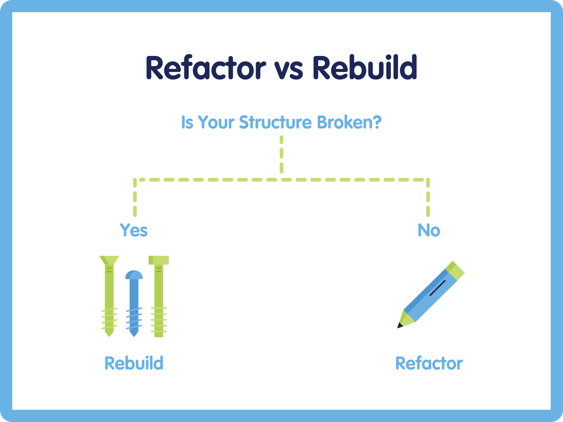
Refactoring is the right call when the foundation of your data model is sound, but the implementation has gotten messy. Think of it as renovation rather than demolition. You're working with what you have, cleaning it up, and optimizing it for where you're going. Refactoring makes sense when:
A well-executed refactor includes auditing and retiring unused fields and objects, consolidating redundant automations into a single well-documented flow architecture, cleaning up page layouts and record types, and establishing naming conventions and documentation standards going forward.
Refactoring is lower risk and faster to execute, but it requires discipline. If the underlying architecture is fundamentally wrong, refactoring is just putting better wallpaper on a crumbling wall.
Rebuilding is the harder conversation, but sometimes it's the only honest one. A rebuild is warranted when the data model's structural problems cannot be solved by cleanup alone. This happens when the model no longer reflects how the business operates, and no amount of patching will fix the misalignment. Signs you need to rebuild:
A rebuild done right isn't starting from zero; it's starting from clarity. You bring forward what works, discard what doesn't, and build something designed for where the business is going, not where it's been.
Two of the biggest risks in a rebuild are scope creep and change fatigue. To mitigate these risks, it can be beneficial to implement a phased approach: stabilize core objects first, migrate data carefully with clear validation checkpoints, and bring users along with training and change management from day one.
If structural integrity is compromised, lean towards a rebuild. If the foundation is right and the other three dimensions are the issues, refactor. If you're unsure, and most companies are, a formal org audit will give you the data to make the call with confidence.
Here's the perspective shift that changes everything: your Salesforce data model isn't a technical detail, it's a strategic asset. It either enables your business to move fast, report clearly, and scale efficiently, or it doesn't. And the longer you let it fall behind your business needs, the more expensive it becomes to close the gap.
The good news? It's never too late to course correct. Companies with significantly more complex challenges than yours have modernized their Salesforce orgs and come out on the other side with platforms that accelerate their growth instead of impeding it.
At Ascend Technologies, we specialize in helping organizations assess, refactor, and rebuild their Salesforce data models with a practical, business-first approach. We don't just clean up your org, we help you build something you can grow into.
If any of this sounds familiar — the workflows that grew too complex, the fields nobody can explain, the reports that require an Excel detour — you're not alone, and you're not too far gone.
At Ascend Technologies, we help organizations assess, refactor, and rebuild their Salesforce data models with a practical, business-first approach. We don't just clean up your org, we help you build something you can actually grow into.
Ready to find out where your data model stands? Let's start with a conversation.
This is the final post in our four-part Managed Services series. Missed an earlier blog? Start from the beginning.

The signs are usually behavioral before they're technical. Your admin needs a flowchart to explain how a record gets created. Simple changes take longer than they should because nobody's sure what else might break. If your team is spending more time working around Salesforce than inside it, technical debt is almost certainly the reason — and a formal org audit is the fastest way to find out how much you're dealing with.
A Salesforce org audit is a structured assessment of your data model, automation architecture, field usage, and overall system health. It surfaces unused customizations, conflicting automations, and structural misalignments. If you're unsure whether your org needs a refactor or a full rebuild, an audit gives you the data to make that call with confidence rather than guesswork.
It depends on complexity, but most refactors follow a phased approach: automation and core objects first, then page layouts and reporting. A mid-complexity org typically takes anywhere from a few weeks to a few months. The bigger variable isn't usually technical; it's having clear priorities, stakeholder alignment, and a partner who understands both the platform and your business.


Salesforce, Salesforce Tips and Tricks
October 06, 2026
Read Now

Salesforce, Salesforce Tips and Tricks
October 01, 2026
Read Now

Salesforce, Salesforce Tips and Tricks
September 29, 2026
Read Now