


Salesforce, Salesforce Tips and Tricks
From Backlog to Business Impact: How Managed Services Turn Requests into Results (Clone)
June 15, 2026
Read Now.svg)

June 15, 2026
.svg)
.svg)


"Hey, can you automate this?" We’ve all been there. A request comes in, the clock starts ticking, and the real question becomes: what’s the right tool and pattern to build something quickly without creating long-term technical debt?
This blog distills insights from a deep conversation with our in-house Flow expert. It provides a clear, opinionated playbook for admins and developers who want Flows that are fast, understandable, and easy to maintain. It’s practical, it’s candid, and it assumes you’re building in the real world, where limits, integrations, and real-world constraints collide.
Choosing the Right Automation (Flow vs. Apex)
Before-Save vs. After-Save (and When to Subflow)
Design for Scale (Governor Limits Are Real)
Naming Conventions & Documentation (Your Future Self Will Thank You)
Designing for Flexibility and Reuse
Operating and Supporting Your Flows in Production
Before diving into patterns and design, here are a few principles that guide everything else.
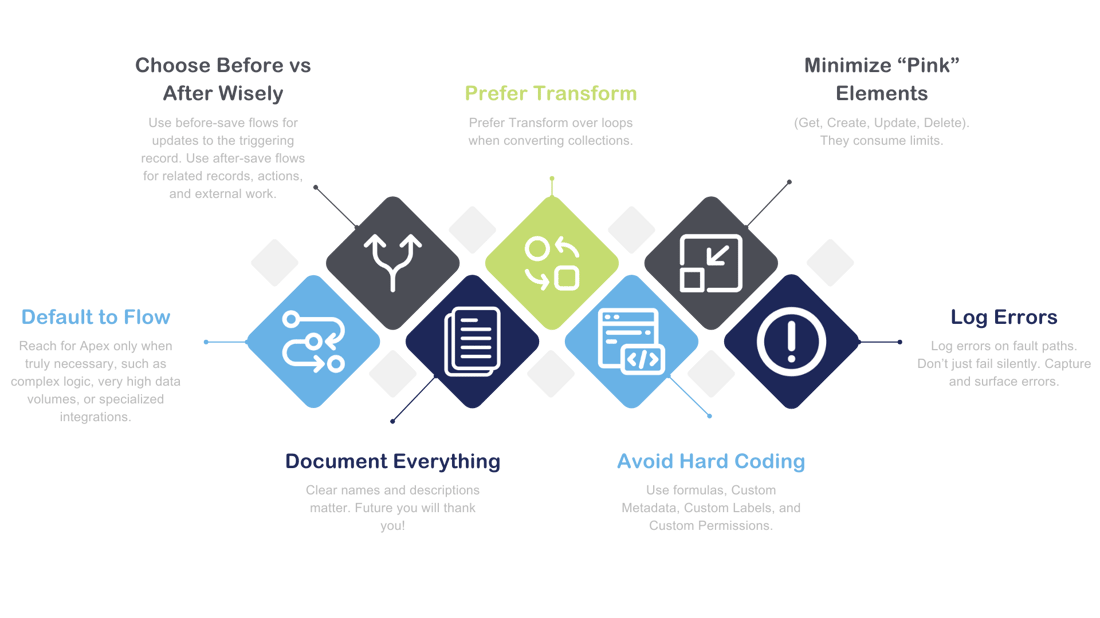
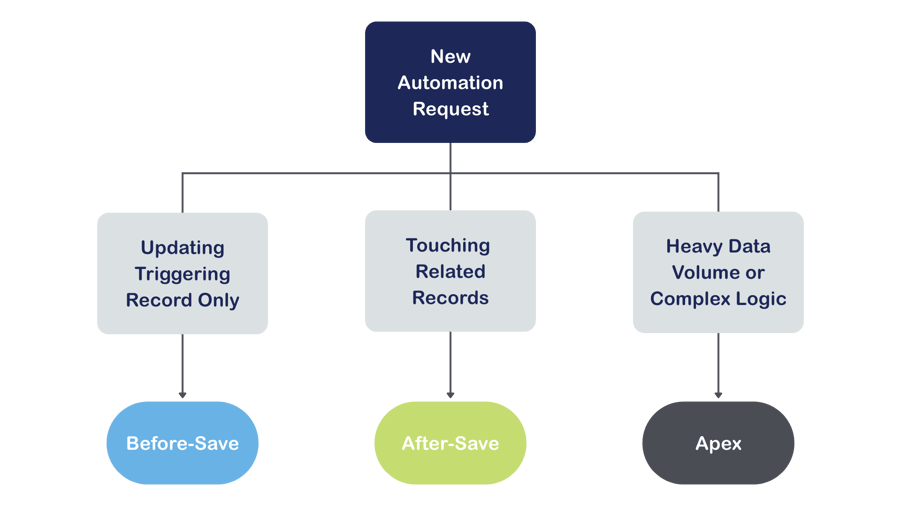
Start with Flow. It is the platform standard. If the requirement:
Involves heavy data volumes
Requires long-running or compute-intensive logic
Needs specialized external integrations
Pushes against Flow limits
Then consider Apex, or an invocable Apex action called from Flow.
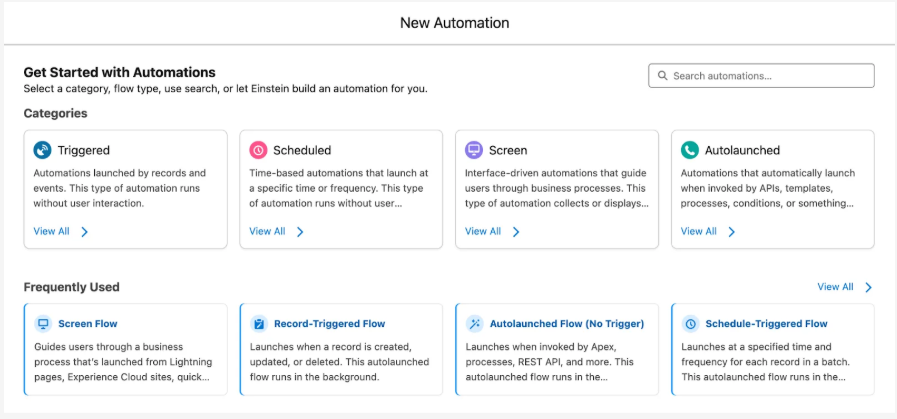
Important Note: Workflow Rules and Process Builder are retired technologies. Do not start anything new there.
Flows can be invoked in several ways:
Record-Triggered (create, update, delete)
Screen / Quick Actions (user-initiated via button/screen)
Scheduled Flows (batch operations on a defined cadence)
Autolaunched Flows (called from Apex, other flows, or processes)
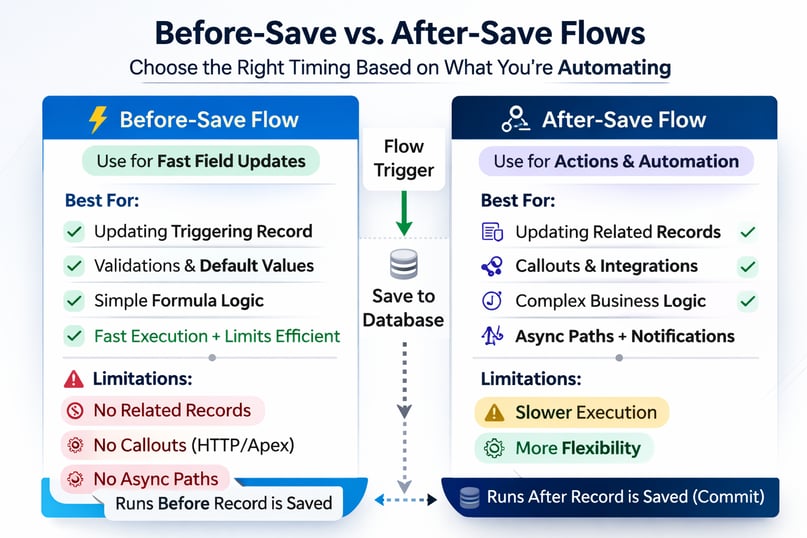
Use before-save flows when you are only updating the triggering record. They are:
Faster
More limit-efficient
Ideal for deterministic field updates and simple logic
If you don't need related records, stay here.
Use after-save flows when you need to:
Update related records
Call Apex or HTTP integrations
Perform more complex orchestration
Combine after-save flows with Asynchronous Paths to defer heavy or non-critical work until after the transaction commits.
Subflows are valuable when:
The logic is reused across multiple flows
You want to isolate a unit of logic that can be independently tested
Examples:
Standardize Phone
Post to Chatter
Enrich Address
Avoid creating a maze of subflows where understanding behavior requires opening five canvases. That becomes a maintenance burden.
Rule: Default to a single, well-structured flow. Extract to a subflow only when it meaningfully improves reuse or isolates a unit of logic you can test independently.
In Flow Builder, data elements appear in pink, (Get, Create, Update, and Delete). These are the most resource-intensive operations in your flow. Treat them as if they have a cost attached, because from a governor limit perspective, they do.
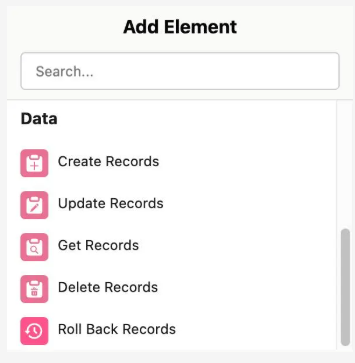
Leverage relationships already on the triggering record before querying again (e.g., you already have AccountId on Opportunity, so don’t query for it)
Batch your updates: collect records into a variable and perform one Update
Offload expensive work to Asynchronous Paths when possible
Data Manipulation Language (DML) or queries inside loops
Excessive, redundant "Gets" when a field is already available
If you need to derive a new collection from another, use Transform instead of looping. For example: Converting Opportunities into a collection of Account IDs. Transform is more efficient and aligns with Salesforce best practices.
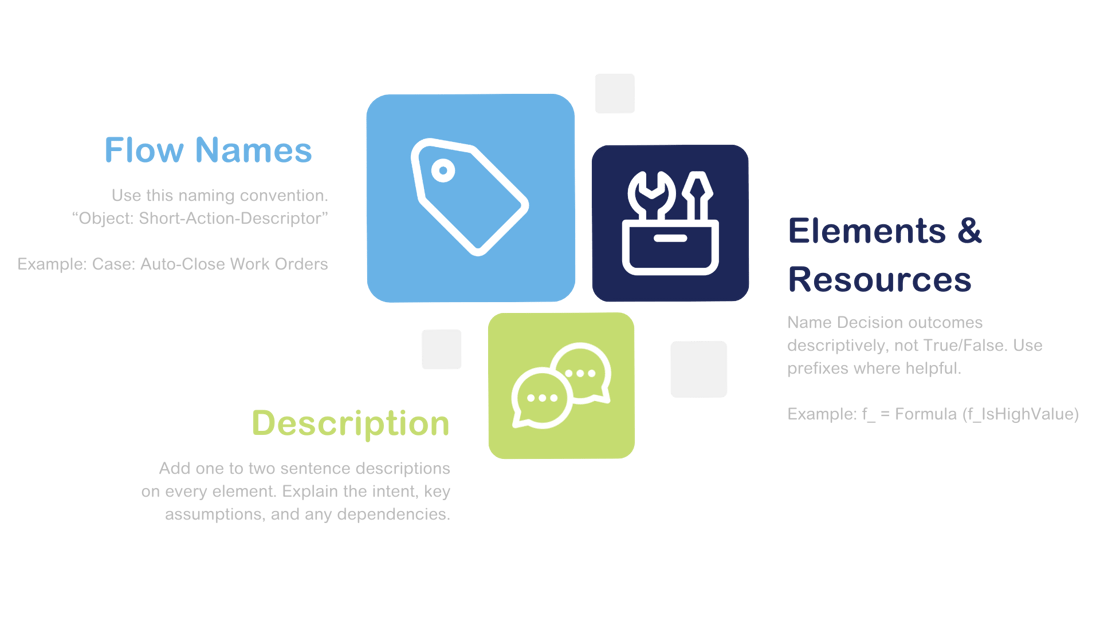
Clear, consistent naming makes your flows easier to understand, update, and troubleshoot. It may feel unnecessary today. It will save hours later.
Scalable flows are not just limit-safe. They are adaptable. Requirements change. Record types evolve. New business lines are introduced. Good automation absorbs change instead of breaking under it.
Hard-coded values make automations brittle. They work today, but they break quietly when business rules evolve. Instead, design for flexibility:
Formulas create dynamic logic and minimize future edits
Custom Metadata acts as admin-managed configuration tables, ideal for thresholds, mappings, and rule logic
Custom Labels store text and IDs, prevent hard-coding, and support translations
Custom Permissions allow you to toggle features or bypass logic for specific user groups
Pro tip: Centralize values such as record type IDs, status codes, and API names in Custom Labels or Custom Metadata. Update once and benefit everywhere.
Sometimes, Flow is not the most efficient place for heavy logic.
Invocable Apex is ideal for:
Complex SOQL (Salesforce Object Query Language)
Large-batch DML
Specialized security logic
In larger orgs, shared invocable libraries:
Reduce duplication
Improve performance
Standardize behavior
This is about reuse and architectural consistency.
Even small configuration decisions can impact performance and maintainability.
All fields vs. specific fields: Selecting All fields can reduce upfront configuration effort. However, Salesforce only materializes fields that are referenced later in the flow. If a field is needed solely for a message, screen display, or downstream logic, make sure it is explicitly referenced so it is available at runtime.
Check for results: Use Is Empty on the returned record or collection to determine whether results were found. This approach provides clearer, more readable, and more reliable results than older comparison patterns.
Once your flow is scalable, the next question is: will it survive change?
Building a flow is only half the job. The real test begins after deployment. In production environments, automations must handle real users, real data volumes, security constraints, and unexpected edge cases. Designing for supportability, governance, and operational stability is what separates working flows from enterprise-grade automations.
Always understand the context in which your flow executes.
Record-Triggered and Screen Flows run as the invoking user by default
Scheduled Flows run as the process automation user
Some flows can run in System Context, bypassing object- and field-level security
System context is powerful, but it should be used intentionally and documented clearly. It can allow actions that users would not normally be permitted to perform.
Guardrails: If a user should not be able to perform an action manually, think carefully before allowing a flow to perform it implicitly.
Security behavior should never be accidental.
Enterprise orgs regularly perform large data operations. Your flows must account for that reality.
Common approaches include:
Entry criteria or decision logic driven by a Custom Permission or Custom Metadata flag
Temporary deactivation during major data loads, used as a last resort and carefully coordinated
Bypasses should be designed deliberately. Control, audit, and reverse them as needed.
For Scheduled Flows:
Keep batch sizes small
Keep logic efficient
Smaller batches often reduce runtime errors and limit collisions
For record-triggered flows, use Asynchronous Paths to defer non-critical work. This reduces transaction spikes and helps avoid governor limit conflicts in high-volume environments. Think in terms of transaction health, not just functionality.
If your flow fails silently, it is not production-ready. Fault paths give you a second chance to do the right thing when something fails.
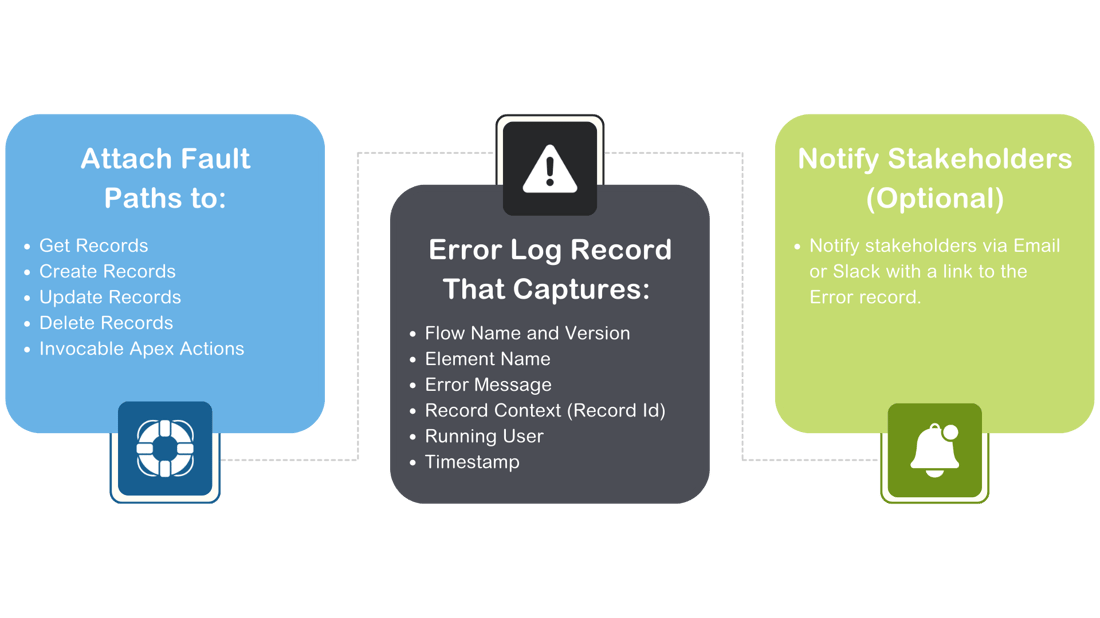
This is especially critical in enterprise environments where builders and production support teams are different people. Visibility reduces downtime.
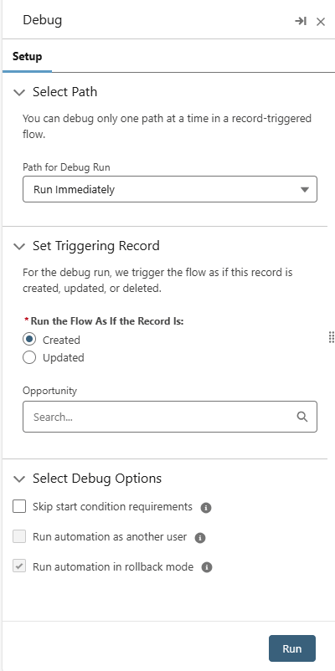
Even well-designed flows require troubleshooting. Start with the standard Flow Debugger.
If formulas behave unexpectedly:
Use Assignment elements to capture intermediate values into temporary debug variables
Surface those values during testing to validate logic
For Screen Flows:
Test using the actual target profile or permission set
Confirm behavior under real-world access constraints
Effective debugging is structured, not reactive.
Flow versions accumulate quickly. You'll hit 50 sooner than expected.
Production discipline includes:
Periodically pruning inactive versions
Keeping a limited number of prior versions for rollback
Testing methodically when modifying dependent components
Salesforce dependency warnings are helpful, but not comprehensive. When making structural changes:
Move incrementally
Test after each adjustment
Validate impacted automations
Version management is part of lifecycle governance.
Flow-based approvals are increasingly common, but they should follow the same enterprise principles:
Centralize approval logic
Avoid hard-coded routing rules
Monitor limits carefully
Test with real user permissions and security constraints
Approval automation is powerful, but complexity scales quickly. Design for clarity and observability from the start.
Scenario: When a Case is closed, close all related Work Orders and log a summary:
Record-Triggered Flow on Case, after-save, when Status changes to Closed.
Get Records: Related Work Orders (filter by Status != Closed).
Transform: Work Orders to collection of Work Orders with Status = Closed (or prepare a collection variable for update).
Update Records (once, on the collection).
Async Path: Create a Summary record and send notification.
Fault Paths on the Get/Update to create Error Log entries.
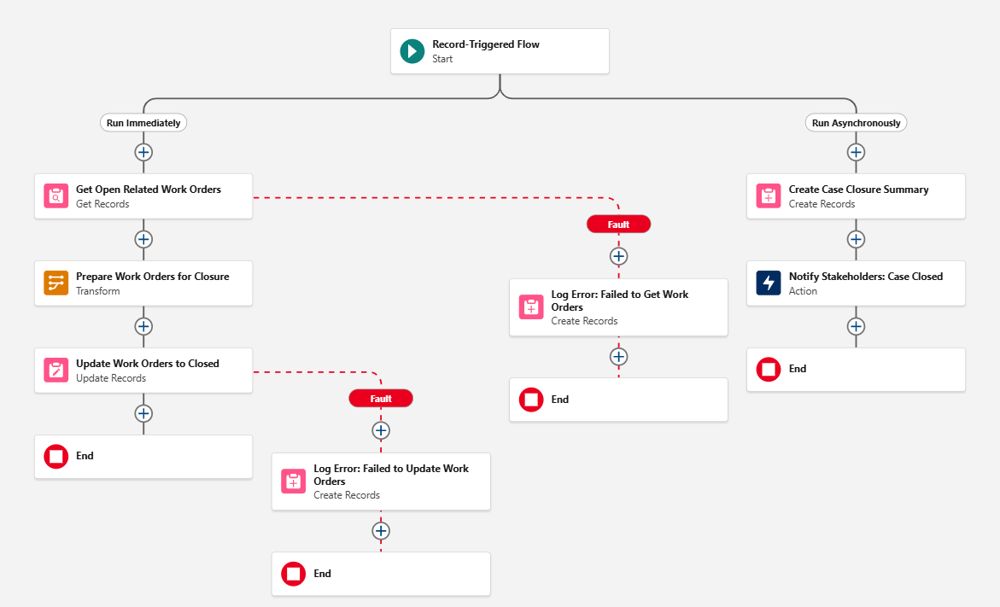
Note: If closing Work Orders requires logic that varies by product line, consider Custom Metadata to map Case Category to Work Order rules instead of hard-coding.
Great flows are not just working automations. They are clear, scalable systems that other admins and architects can understand immediately. If you:
Choose before-save and after-save intentionally
Control pink elements
Prefer Transform over loops
Document consistently
Avoid hard-coded values
Design for production support
You’ll build automations that run fast today and stay maintainable tomorrow.

Use before‑save flows for simple field updates on the triggering record. Use after‑save flows when you need related records, complex logic, or integrations.
Use a subflow when logic is reused or you want clean, testable modules. Avoid them if they create a chain that's hard to follow.
Minimize the number of “pink” elements like Gets and Updates. Batch updates and use asynchronous paths for heavier work.
Check whether the triggering record already contains the data you need. Only query when truly required.
Use clear, descriptive names and short descriptions for intent and assumptions. Good naming makes flows much easier to maintain.
Hard‑coded values break quietly when business changes occur. Use Custom Metadata, Custom Labels, and formulas instead.
Use configuration-based rules instead of embedding logic directly into elements. This allows admins to maintain and adjust without rewrites.
Know whether the flow runs as the user or in system context. Document this clearly to avoid unintentional bypasses of security.
Always add fault paths to data actions and Apex. Logging errors into a custom object makes support and troubleshooting much easier.
Use the Flow Debugger and create temporary variables to surface intermediate values. Test using real profiles to ensure accurate permission behavior.

Salesforce, Salesforce Tips and Tricks
June 15, 2026
Read Now
Salesforce, Salesforce Tips and Tricks
June 15, 2026
Read Now

Salesforce, Salesforce Tips and Tricks
June 15, 2026
Read Now